(and Some Hints for Resource Agent Authors and Systems Engineers)
Contents
- Introduction
- Causes of STONITH in Heartbeat/Pacemaker Clusters
- Why Is The Contrived Example Broken?
- How Can We Fix The Contrived Example?
- So What Else Can Go Wrong?
- WTF is a Best Worst Case Failover Time?
- Avoiding STONITH Deathmatch
- Debugging STONITH Deathmatch
Introduction
If you’ve done anything interesting with highly available systems (including but not limited to systems built on Heartbeat and/or Pacemaker), you will have encountered the need to fence misbehaving or otherwise broken nodes. One approach is to kill the (allegedly misbehaving) node, i.e. Shoot The Other Node In The Head, or STONITH for short. In a two-node HA cluster, you end up with hardware that looks something like this:
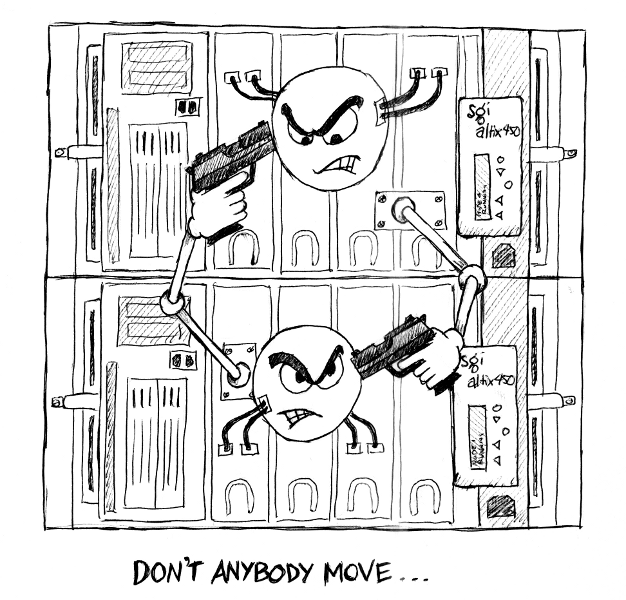
Unfortunately, it’s possible to wind up in a situation where each node believes the other to be broken; the first node shoots the second, then when the second reboots, it shoots the first, and so on, ad infinitum, until you realise that perhaps a single non-HA node would have been both cheaper and more reliable. This can aptly be referred to as a state of STONITH deathmatch.
The remainder of this document focuses specifically on Heartbeat/Pacemaker HA clusters; while similar principles may apply to other software stacks, the specifics will likely vary.
Note:
- Familiarity with terminology such as constraint scores, start/stop/monitor operations, intervals and timeouts is assumed.
- This document is just as applicable if you’re using OpenAIS instead of Heartbeat.
Causes of STONITH in Heartbeat/Pacemaker Clusters
In the case of Heartbeat/Pacemaker HA clusters, there are basically three reasons for one node to STONITH the other:
- Nodes are alive but unable to communicate with each other (i.e. split-brain).
- A node is physically dead (kernel panic, HB/Pacemaker not running, no power, motherboard on fire and smoke seeping out of case, etc.)
- An HA resource failed to stop.
The first cause can – and should – be mitigated by ensuring redundant communication paths exist between all nodes in the cluster, and that your network switch(es) handle multicast properly.
The second cause is fairly obvious, and unlikely to be the cause of STONITH deathmatch; nothing here will make the soon-to-be-dead node think its partner is also in need of killing.
The third is perhaps not so straightforward. The specifics of the following may vary depending on your configuration, but roughly, here’s how the game is played:
- An HA resource (web server, database, filesystem, whatever it is you’re trying to make highly available) is started on one node.
- If the start succeeds, the resource will be monitored indefinitely.
- If the start fails, the resource will be stopped, then re-started on either the current node, or another node.
- While the resource is being monitored, if the monitor ever fails, the resource will be stopped, then re-started on either the current node, or another node.
- If a resource needs to be stopped, and the stop succeeds, the resource is re-started on either the current node, or another node.
- If a stop fails, the node will be fenced/STONITHd because this is the only safe thing to do. If you can’t shut down the web server, close the database, unmount the filesystem or otherwise safely know you’ve terminated the HA resource, the least-worst course of action is to kill the entire node – hard, and right now – because the alternative is potential data corruption and/or data loss.
Given this chain of events, it is critically important that creators of resource agents (i.e. the scripts that start, stop and monitor HA resources) ensure that stop operations always succeed, unless the resource cannot actually be stopped. Here’s a contrived example of how not to do this, for an HA filesystem resource:
#
# This is a contrived example.  Do not do this in real life.
#

start()
{
    if mount $DEVICE $MOUNTPOINT
    then
        return $OCF_SUCCESS
    else
        return $OCF_ERR_GENERIC
    fi
}

stop()
{
    if umount $MOUNTPOINT
    then
        return $OCF_SUCCESS
    else
        # This is broken!
        return $OCF_ERR_GENERIC
    fi
}
Why Is The Contrived Example Broken?
The contrived example is broken because:
- If the start succeeds, and the filesystem is mounted, the only reason for a stop to fail is if the filesystem cannot be unmounted. That’s sane cause for STONITH. No problem here.
- If the start fails, the resource will be stopped (refer point 3 above). But in this case, if the start failed, it’s because the filesystem could not be mounted. If the filesystem is not mounted, the stop will also fail as implemented above, because umount can’t unmount something that’s not mounted. The stop failure will result in an unexpected and completely unnecessary STONITH.
- Worse, if the filesystem cannot ever be mounted because it is, for example, corrupt in some fashion, the start will be attempted on one node; this will fail, and a stop will be attempted. This will also fail, and the node will be shot. The start(failure)/stop(failure)/fatal-gunshot-wound-to-the-head cycle will be repeated on the next node, and so on forever. Deathmath. Tricky to debug if neither node will stay up long enough for you to read the log files!
How Can We Fix The Contrived Example?
Simple: Don’t try to unmount the filesystem if it’s not already mounted. Optimally, fish around in /proc/mounts if it’s available. If not, try checking the output of mount $MOUNTPOINT.
More generically, the goal here is to find the cheapest, most efficient means of checking whether an HA resource is already stopped, then return success if it is already stopped. Only if it’s not already stopped should your resource agent attempt to actually stop it, and thus possibly result in a failure and subsequent STONITH.
It is also important to avoid metafailures; for example a simple syntax error in the stop script can ultimately result in what appears to be a failure, causing a STONITH for entirely the wrong reason.
So What Else Can Go Wrong?
Several things, but really it boils down to these two:
- Timeouts, and,
- Things you didn’t think of.
Timeouts
In Heartbeat/Pacemaker clusters, all operations (start/monitor/stop) have a timeout. If this timeout elapses prior to the completion of the operation, the operation is considered failed.
So, let’s try another contrived example: Assume you have a highly available filesystem resource, and your stop timeout is set to 30 seconds. Now imagine you’re about to stop the filesystem, but you’ve got a whole lot of dirty data that’s going to be flushed as part of the unmount. In this example, the unmount is going to take longer than 30 seconds.
1, 2, 3, … 29, 30, *BANG* You’re dead. For no good reason. And half your dirty data wasn’t flushed to disk. Whoever owns that data is not going to be happy, and what’s worse, the stop probably would have succeeded if we hadn’t hit that timeout.
One solution is to ensure that your stop timeouts always exceed the duration of the longest possible successful stop. One issue with this solution is that it will increase your “best worst case failover time”. Depending on your application this may or may not be a problem; either way, you need to do the numbers – see below for details.
Things You Didn’t Think Of
It’s difficult to ensure this section is exhaustive; I certainly can’t write about the things I didn’t think of. That aside, here’s yet another contrived example that illustrates a potentially non-obvious problem:
#
# This is yet another contrived example.  Do not do this in real life.
#

stop()
{
    # This is broken for several reasons, but they might not be obvious
    if df | grep -q $MOUNTPOINT
    then
        if umount $MOUNTPOINT
        then
            return $OCF_SUCCESS
        else
            return $OCF_ERR_GENERIC
        fi
    else
        # filesystem is not in df output, thus was not mounted,
        # thus stop is successful
        return $OCF_SUCCESS
    fi
}
The intent here is good: check if the filesystem is mounted; if it’s not already mounted, return success. If it is mounted, unmount it and return success if the unmount succeeds. Most of the time it will actually work.
The problem (aside from that grep being way too loose – it’ll partial match on similar mountpoints) is that df examines all mounted devices. It can block for a while if some mounted filesystem is under heavy load. It can block forever if some mounted filesystem has disappeared completely (e.g. a remote NFS mount). And then you’re back in timeout land, and then you’re dead.
Even if you only run df on the mountpoint you care about, it’s still going to hit the disks; if the filesystem you’re looking at is under load, that df might take a while, which is why you’re better off looking in /proc/mounts… But that’s not the point.
The point is: you are trying to figure out if you can return success for a stop operation without relying on any other system state outside the resource you are trying to stop. If you can return success, great! If you can’t, you then need to stop that resource without relying on any components of the system other than those absolutely necessary to effect the stop.
WTF is a Best Worst Case Failover Time?
The “best worst case failover time” is the least amount of time it will take, under the most adverse conditions, for a highly available resource to fail on one node, restart on another node, and become accessible to client systems again.
Put another way, it’s the maximum potential downtime you need to mention in the fine print of any sales contract.
Bearing in mind the flexibility available with resource constraint scores, we need a fourth contrived example. Imagine a two-node HA cluster, running a single HA resource, configured such that a failure of that resource on one node will trigger a migration to the other node, and vice versa, until eventually the resource becomes unrunnable. Assume that we have timeouts and intervals set as follows:
- start timeout
- 20 seconds
- monitor interval
- 20 seconds
- monitor timeout
- 30 seconds
- stop timeout
- 60 seconds
Here’s the sequence of events involved in a worst case failover:
- Resource starts successfully.
- Resource is monitored for a while, but dies somehow immediately after one of the successful monitor ops.
- 20 seconds later, the next monitor op runs, and times out (implicit failure after 30 seconds).
- Due to the implicit monitor failure, a stop op is initiated.
- The stop also times out for some reason (implicit failure after 60 seconds).
- The node is STONITHd, due to stop failure.
- The resource is started on the other node, in no more than 20 seconds (any longer would indicate complete failure due to timeout; the resource can’t run anywhere).
Add all the numbers together, and the best worst case failover time is:
20 (monitor interval) + 30 (monitor timeout) + 60 (stop timeout) + 20 (start timeout) = 130 seconds
An average failover might be 10 seconds of monitor interval, plus successful monitor failure, stop success and start success of a second each, giving a failover time of 13 seconds to brag about. And that’s really good. But bragging rights don’t help if the system breaks in a way you didn’t think of, and your client is not aware that the best worst case failover time is an order of magnitude larger than what you quoted as a happy general case.
Look at the resource constraints, scores, intervals and timeouts. Do the numbers. Become afraid. It’s worth it.
Avoiding STONITH Deathmatch
- Double- and triple-check that you really do have redundant communication paths between all nodes, so as to avoid split-brain scenarios.
- Ensure network switches handle multicast correctly. There has been at least one case where a switch taking too long to reform the multicast group resulted in deathmatch. Increasing the value of Heartbeat’s initdead option and/or Pacemaker’s dc-deadtime option can solve this, if you can’t convince your switch to behave itself.
- Don’t start the cluster at boot time (chkconfig heartbeat off). If one node is shot, it won’t automatically try to regain membership on next boot, thus giving you a chance to investigate further.
- Set stonith-action to poweroff instead of reboot. As with not starting the cluster at boot time, this ensures that the first node shot will not immediately come back up guns blazing.
Debugging STONITH Deathmatch
Tricky, but not impossible. Life will be easier if you can:
- Get a console on all the nodes (IMPI/SOL, physical presence in front of the system, etc.)
- chkconfig heartbeat off, then start it manually as necessary.
- Instrument as much of the resource agent scripts as you can, to log state to disk somewhere. Preferably to a disk that won’t vanish if a node is unexpectedly STONITHd.
- “unmanage” troublesome HA resources (use crm_resource to turn is_managed off, then run start and stop ops manually, and see what breaks.
- For intermittent faults, open a screen session on some other stable system, point it at the HA rig then tail the console output and any relevant log files, preferably saving everything to disk on the stable system.
- Take a break every now and then to re-focus your eyes.
Revision History
| 2009-08-13 | Mention potential network switch multicast problems. |
| 2009-08-10 | Add split-brain as cause of STONITH, mention OpenAIS, add “Avoiding STONITH Deathmatch” section, fix a few typos. |
| 2009-05-14 | Initially published at http://ourobengr.com/ha |
(Like the picture? It comes on a t-shirt!)
Excellent article. From a guy who just resolved a deathmatch yesterday.
Very nice article. I have seen several web sites that recommend or flatly state that STONITH will not work properly on a two node system – you much have three (or more) nodes to have the proper number of votes for a quorum. This is my biggest complaint, being new to the HPC, HA community – too often finding conflicting information. Thanks for sharing your insights! Cheers, Steve
Excellent article. Thanks a lot for that
Great article light enough to digest with enough information for this HA noob to understand. Saved my bacon, thanks!!!
Thanks for writing this! You’ve got a bunch of hard-to-find information compiled in here!
Seven years old and this article is, by large, the best written, argued, explained and most useful regarding this subject. After two weeks exploring google results and pursuing links in referenced sites, I have concluded that 99% of writers have never solved an actual split brain situation. I’ve seen valued contributions in places like stackexchange saying that a broken link between nodes it’s not a real testing scenario. Thank you very much.
regarding, ” I’ve seen valued contributions in places like stackexchange saying that a broken link between nodes it’s not a real testing scenario.”
I’ve seen that as well, and I THINK they MAY be referring to a ‘direct connect’ between the 2 systems because the LINK would drop on both nodes if the cable is pulled for the test. As far as I can reason, the correct config requires at least 2 physical wires per server to redundant interconnected switches. Pulling BOTH wires from one system SHOULD be a valid test. (Unspecified Network outage to one node). That being said, I’m not certain how corosync will handle a “Faulty” interconnect. Will it ‘self fence’ ? Anyone know? If we run a 2nd ring on the production network (passive) then the nodes would just stay happy…
Ecellent article, you really saved me from madness !!!
Thanks for the excellent info. Happy holidays.
This scenario is still relevant in Public Cloud Platforms. Great Explanation Ten Years Later!